Dive iNat: from dive video to iNaturalist
Tl;dr: I made a workflow for getting stills and gifs out of YouTube videos and into iNaturalist. You can play with it now. It needs a better name.
I film a lot of my dives; weirdly it turns out that a lot of people find my breathing relaxing. There is a lot of wildlife in those videos, but to get it onto iNaturalist takes a surprisingly long time. An observation needs a photo, a time and a place, and getting those out of a video by hand (scrub to the moment, screenshot, crop, work out what time it was, guess the depth) is slow enough that I only captured the most exciting animals.
I’ve (well Claude did the work) made a small tool to do the tedious parts. It’s called Dive iNat, and it’s free to use in Chrome.
What it does
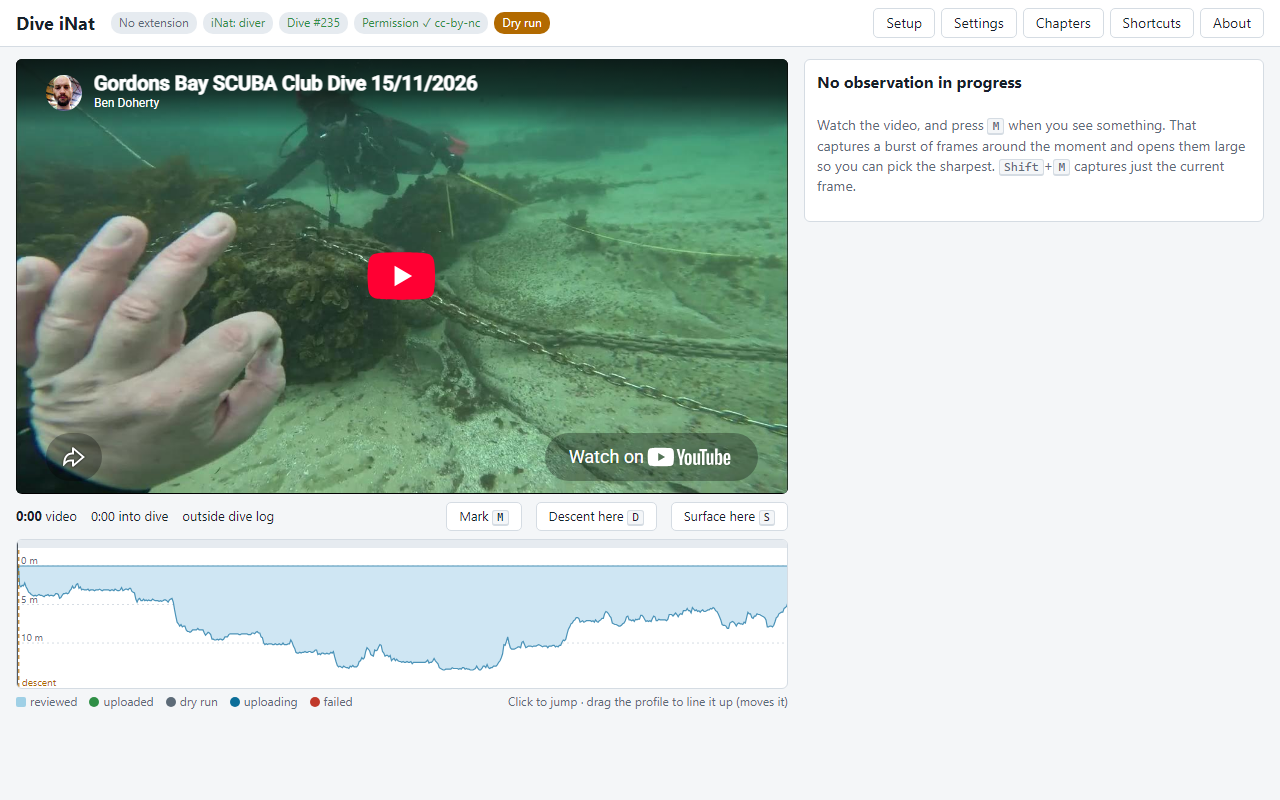
You give it a YouTube link to your dive video, and the log of the same dive exported from Subsurface. You line the two up by pausing on the frame where you go under and the frame where you surface, and from then on the tool knows what the dive computer was saying throughout the video.
When something worth recording swims past, you press M. The tool grabs a burst of full-resolution frames around that moment, ranks them by sharpness, and lets you pick up to four. You can click on the animal to note where it is in the frame, add a crop of it, or make a short GIF, which helps with things that are easier to identify by how they move. Press C, then Enter, and it’s on iNaturalist.
Each observation gets the time, worked out from the dive log; the depth and water temperature, as iNaturalist observation fields; the GPS position recorded at the start of the dive; and a link back to the exact second of the video. That last part means anyone looking at the observation can go and watch the animal moving, which can help pin down an ID.
The tool doesn’t try to identify anything. iNaturalist already has a large community of people who are good at that, and I’m not. In fact, it tries to do as little as possible.
An example: Gordon’s Bay, 15 November
The first proper test was a shore dive at Gordon’s Bay on 15 November: 112 minutes, a maximum depth of 13.7 m, and 20 °C water the whole way. From the video I made 49 observations. A few days later, 34 of them are research grade, they cover 21 different taxa, and 16 people other than me have added identifications. The list is mostly what you would expect at Gordon’s (eastern blue groper, white-ears, red morwong, a run of common stingarees near the end), plus a few I was pleased to have, such as a crested hornshark egg case.
Once the identifications have settled, the tool can turn them into YouTube chapters, so the video itself becomes an index of what was seen. For this dive the start of that list looks like this:
7:04 Eastern Blue Groper (Achoerodus viridis) https://inaturalist.org/observations/415038559
11:17 Scorpionfishes and Allies (Scorpaenoidei) https://inaturalist.org/observations/415049666
12:50 Eastern Blue Groper (Achoerodus viridis) https://inaturalist.org/observations/415052145
What it doesn’t do (yet)
-
The location is the dive’s entry point, as recorded by the dive computer (if you’re fancy), and every observation from the dive gets the same one. On a shore dive at Gordon’s that is close enough, but on a long swim or a drift dive the animal could be hundreds of metres away. The notes on each observation say this plainly, and the tool marks the location as accurate to 150 m by default.
When I was mapping Gordon’s Bay for my DM, I towed a phone in a waterproof box on a float and matched photo timestamps to the track it recorded. The same trick would work here: the tool already knows the time of every frame, so with a track it could place each observation along the route rather than at the entry point. It won’t be exact, because the float drifts at the end of its line and the error grows with depth, but it would make the locations much more useful, particularly for long shore dives and drift dives.
-
The timing is only as good as the sync. My computer records a sample every 10 seconds, so the depth is interpolated between samples, and lining up the video depends on you choosing the right frames.
-
It only works in desktop Chrome and other Chromium browsers, because of the extension (more on that below). You log in by pasting an iNaturalist API token, which lasts 24 hours; if people find the tool useful, I’d like to replace that with a proper login. Captured frames live in memory, so if you reload the page in the middle of an observation, you lose it, and that needs fixing too. Further off, I’d like a mode for video without a dive log, for snorkellers and anyone else filming outside.
No server
I have a strange aversion to servers. It’s slowly improving, but they add so much technical and legal complexity. The whole thing is a static website, so there is no server behind it, no account to create, and no analytics. The dive log is read, the observations are made, and the package is put together, all in your browser. Then the browser sends them straight to iNaturalist. Your iNaturalist token is stored in your local storage and sent only to iNaturalist. I couldn’t collect your data if I wanted to.
The one awkward part of not having a server is that web pages aren’t allowed to read pictures out of an embedded YouTube player. A small Chrome extension, the Dive iNat frame grabber, does that one job. It runs only inside the player on the Dive iNat page, copies the frame you’re looking at, and hands it to the page. It has no network access and stores nothing. It doesn’t download videos either; it can only see what you are already watching. The privacy page says the same thing at more length, and all of the code is on GitHub for anyone who would like to check.
Other people’s videos
The tool works with any YouTube dive video, but please only use your videos or videos whose owner has said yes. The frames go up under your iNaturalist account’s photo licence, so you are agreeing to that licence on behalf of the owner too. The tool asks you to confirm this for each video, and writes the credit into the notes.
Trying it
If you have a dive video on YouTube and a Subsurface log for the same dive, it should take a few minutes to get going:
- Install the frame grabber extension.
- Open Dive iNat and follow the introduction.
- Keep the keyboard shortcuts to hand; there’s a printable version.
Uploads start in dry-run mode, which shows what would be sent without sending it, so you can try it on a dive without filling iNaturalist with test observations. It’s early, and there will be things that don’t work. If you find one, or have a video that it struggles with, open an issue or tell me about it.
Naming is hard
This doesn’t really have a name yet, but it needs one. If you can think of something interesting, let me know. The same goes for the dive planner tool too.